Blended Learning

Stacks Image 241
Design custom-made blended training courses for your organisation, company or team. This immersion aims to increase digital competences and offers a diverse mix of learning methods in a clear learning path:

- short immersion or inspiration sessions
- workshops
- webinars
- digital self-learning videos
- hackathons
- coaching on demand

This can focus on one specific work area, such as a migration to Microsoft 365, a deployment of Power BI as an analytical tool, but equally on a specific user profile such as the all-round employee, the office manager or on the development of a certain digital competence such as ICT Office skills.

Tailor-made Blended Coaching packages can be pre-engineered or fully customised. The essential advantage of this approach is the diversity of learning methods used. Users can put together components at their own pace, taking into account their individual preferences, and spread over time. Moreover, there are always coaching moments to guarantee a personal touch.
  • SURVIVAL KIT FOR YOUR MIGRATION TO MICROSOFT365

    Bedrijf, organisatie die de overstap maken naar Microsoft 365 en de medewerkers optimaal wil begeleiden en coachen in het gebruik van hun nieuwe tools.

    Communication, organisation, evaluation

    Every migration, change in user experience or work organisation is unique. Within the organisation, different people also have unique needs. It therefore seems impractical to present the same information to everyone in the same way.

    Blended Learning implies that we formulate a tailor-made approach. This means that we inspire employees, do not force them into a straitjacket and give them the opportunity to process the required information about the upcoming changes at their own pace and with their preferred learning method.

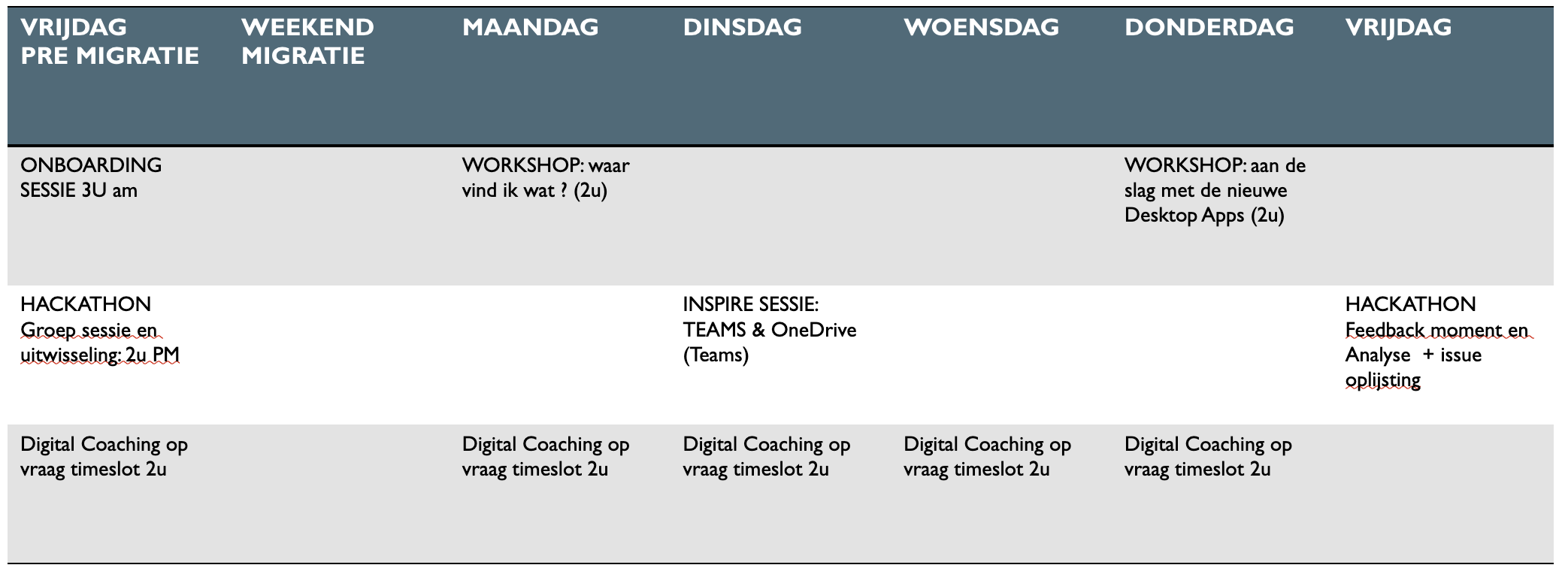
    Below is an example of how a migration to Microsoft 365 could potentially be planned in terms of user support.

  • Promoting a housestyle

    This "Blended approach" focuses on the technical mastery of templates, styles and themes in various Office apps. At the same time, we highlight the creative aspect during hackathons.

    How about some style?

    To promote its own identity, communication is essential for any company or organisation. A consistent corporate identity is very important in this regard. To ensure that all external communication coming from the organisation reflects this house style, templates are needed. These templates are used not only in Word and PowerPoint but also in Outlook, SharePoint sites and when using CoPilot or other AI platforms.


    The following topics are covered:

    - designing, editing, promoting styles in PowerPoint (half-day workshop)
    - house style in Word documents and PDF documents (half-day workshop)
    - communication in Outlook (webinar 1 hour)
    - hackathon: how to integrate our house style in the daily Office story
    - workshop: SharePoint Online Site administrators and focus on house style (2h)
    - coaching-on-demand sessions (estimate 6 hours)

  • Office AllRounder

    If you need a refresher on key Office applications, you've come to the right place.

    An All-Rounder needs to know a bit of it all

    As an Office All-rounder or part of a team, you have several tasks. One or more tools are available for each of these tasks. You ensure that all business documents, such as letters, reports and presentations, comply with house style guidelines. This includes using the right font, colour scheme and logo. You also use planning tools to organise tasks and projects. You set deadlines and take priorities into account.

    You also work with the finance team to set and manage budgets. You ensure that all relevant information is collected and reported accurately. Furthermore, you use collaboration tools, such as Microsoft Teams and/or SharePoint, to collaborate effectively on documents.

    You keep track of changes and communicate well with colleagues.

    Finally, when we send mailings to customers or prospects, you select the right target group and carefully prepare the content, taking into account the house style and the message we want to convey. Moreover, you monitor e-mails, chats and other communication channels to keep abreast of important information and respond to questions and requests from colleagues and customers in a timely manner.


  • The 'POWER USERS'

    First impressions of the world of Power Automate and Power Apps

    Where is that button?

    Both Power Automate and Power Apps enable you to create automated processes. Power Automate focuses on workflow automation, while Power Apps allows you to build custom apps with automated functionality. For example:

    - In Power Automate, you can automate approval processes, notifications, data synchronisation and more
    - In Power Apps, you can create apps that automate data entry, calculations, and business logic. Think of an app that automatically calculates discounts based on user input or an approval process that starts when a form is submitted.